# Learn It - Online Course Platform

***

## Intro

<figure><img src="https://1609363088-files.gitbook.io/~/files/v0/b/gitbook-x-prod.appspot.com/o/spaces%2F75MEj4aY0dTFxyHfvWoE%2Fuploads%2FiclkrOT40JucIvUuuUFu%2Fhttps___meta-q.cdn.bubble.io_f1675251324680x710797994203528600_Frame%2520919.png?alt=media&#x26;token=61269a41-83af-490f-a50c-a55ce88be116" alt=""><figcaption></figcaption></figure>

## Links

🖥️ [Preview link](https://learnittest.bubbleapps.io/)

🌐 [Template page on Bubble Marketplace](https://bubble.io/template/online-course-platform-1671443624828x426861225972072450)

***

## Screenshots

<div align="center" data-full-width="false"><figure><img src="https://1609363088-files.gitbook.io/~/files/v0/b/gitbook-x-prod.appspot.com/o/spaces%2F75MEj4aY0dTFxyHfvWoE%2Fuploads%2FpKafpxiDBheHFfuJHMtt%2F1.png?alt=media&#x26;token=ab2c3399-7506-4806-a5aa-8d70bb35edd0" alt=""><figcaption><p>Index page</p></figcaption></figure> <figure><img src="https://1609363088-files.gitbook.io/~/files/v0/b/gitbook-x-prod.appspot.com/o/spaces%2F75MEj4aY0dTFxyHfvWoE%2Fuploads%2FFRltFnTsRHJ1xN84LyUb%2F2.png?alt=media&#x26;token=00d1c52d-e6a3-43de-8a5b-87bf9c550598" alt=""><figcaption><p>Features</p></figcaption></figure> <figure><img src="https://1609363088-files.gitbook.io/~/files/v0/b/gitbook-x-prod.appspot.com/o/spaces%2F75MEj4aY0dTFxyHfvWoE%2Fuploads%2FTaUWaXjrGQR60qX8Zkrj%2F3.png?alt=media&#x26;token=c1aa7557-2d5d-493b-ba5e-794580941970" alt=""><figcaption><p>Courses page</p></figcaption></figure> <figure><img src="https://1609363088-files.gitbook.io/~/files/v0/b/gitbook-x-prod.appspot.com/o/spaces%2F75MEj4aY0dTFxyHfvWoE%2Fuploads%2FWlEUOuWgGBAfLNH9Oklv%2F4.png?alt=media&#x26;token=518aa11c-76f6-4313-9323-6b2287814948" alt=""><figcaption><p>About us</p></figcaption></figure> <figure><img src="https://1609363088-files.gitbook.io/~/files/v0/b/gitbook-x-prod.appspot.com/o/spaces%2F75MEj4aY0dTFxyHfvWoE%2Fuploads%2FFqtSdfRRHJNFiTPjgjoK%2F5.png?alt=media&#x26;token=e11b3cdc-08dc-49da-92b4-d92a1ae51b8b" alt=""><figcaption><p>Student dashboard</p></figcaption></figure> <figure><img src="https://1609363088-files.gitbook.io/~/files/v0/b/gitbook-x-prod.appspot.com/o/spaces%2F75MEj4aY0dTFxyHfvWoE%2Fuploads%2F1MQYAFuHpg5BvisZHXKD%2F6.png?alt=media&#x26;token=042cc5ca-ded4-49bd-9728-c856edb0d175" alt=""><figcaption><p>Teacher dashboard</p></figcaption></figure></div>

***

## Template details

LearnIt - a great template for the exchange of knowledge and experience. There are two types of users in this template - "Teacher" and "Student". "Teacher" can create a course, convey its knowledge, practice, and experience. The created course can be paid or be free. "Student" can choose the course of interest to him and learn something new. For each type of user, we created informative dashboards with all the necessary information and statistics.

Learn It template features the following:&#x20;

✅ Responsive design&#x20;

✅ Signup/Login&#x20;

✅ Demo Teacher/Student

✅ Teacher dashboard&#x20;

✅ Student dashboard&#x20;

✅ Adding, editing and choosing of courses&#x20;

✅ Statistics by courses (number of use and stage of passage)&#x20;

✅ The opportunity to leave a review&#x20;

✅ Search for courses by categories

This template is sold "as is" but if there are any critical bugs, feel free to reach out. Our team will try to fix them ASAP.\
\
We tried to keep all the workflows and design architecture simple for beginner-intermediate users to use and adjust. However, we recommend having at least moderate experience with Bubble to be able to fully use and edit the app’s backend.\
\
If you need any assistance to customize this template for your personal or business project, feel free to reach out to our team via <dev@appassion.io>. We are always there to help build new products and mobile/web applications.\
\
We hope this template would become a great starting point for your project.

{% hint style="warning" %}
*<mark style="color:red;">**Removing the banner**</mark>*

*<mark style="color:red;">**1. Open the app in Bubble editor**</mark>*&#x20;

*<mark style="color:red;">**2. Go to settings -> SEO/Metatags**</mark>*&#x20;

*<mark style="color:red;">**3. Remove the content of "Script in the body"**</mark>*
{% endhint %}

***

## User flows&#x20;

**Main user flow:**

&#x20;-> Sign up/Login; -> Course search; -> View course; -> Course purchase and payment; -> Ability to leave comments; -> View all subscriptions and analytics in your personal dashboard.

***

## Key features

<table data-view="cards"><thead><tr><th></th><th align="center"></th><th></th><th data-hidden data-card-cover data-type="files"></th><th data-hidden data-type="checkbox"></th></tr></thead><tbody><tr><td></td><td align="center"><mark style="color:orange;"><strong>MULTISELECT EDITOR</strong></mark></td><td></td><td></td><td>true</td></tr><tr><td></td><td align="center"><mark style="color:orange;"><strong>DROPDOWN RICH TEXT</strong></mark></td><td></td><td></td><td>false</td></tr><tr><td></td><td align="center"><mark style="color:orange;"><strong>CHART ELEMENT</strong></mark></td><td></td><td></td><td>true</td></tr><tr><td></td><td align="center"><mark style="color:orange;"><strong>COURSE MANAGEMENT</strong></mark></td><td></td><td></td><td>true</td></tr><tr><td></td><td align="center"><mark style="color:orange;"><strong>STUDENT PROGRESS TRACKING</strong></mark></td><td></td><td></td><td>true</td></tr><tr><td></td><td align="center"><mark style="color:orange;"><strong>COLLABORATION TOOLS</strong></mark></td><td></td><td></td><td>false</td></tr></tbody></table>

## Workflows&#x20;

### Primary colors and their purposes

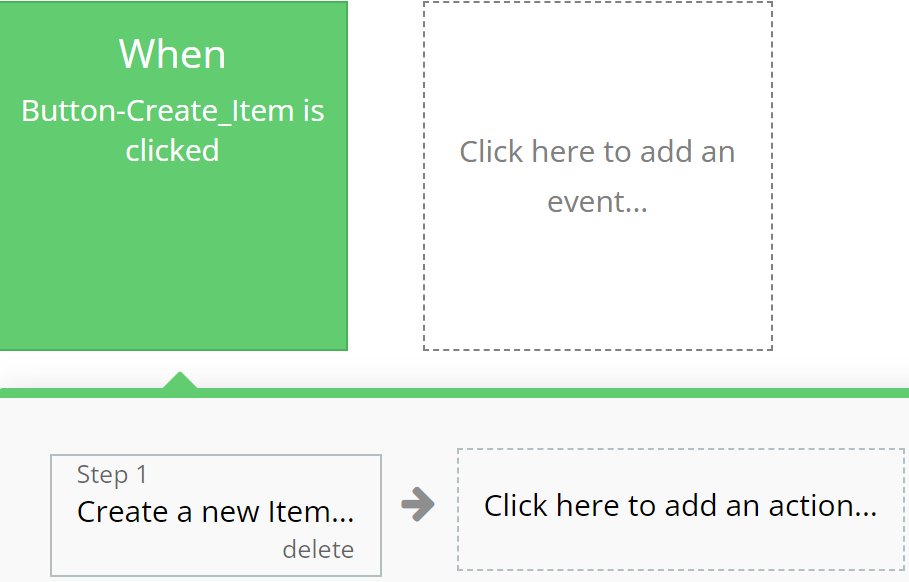
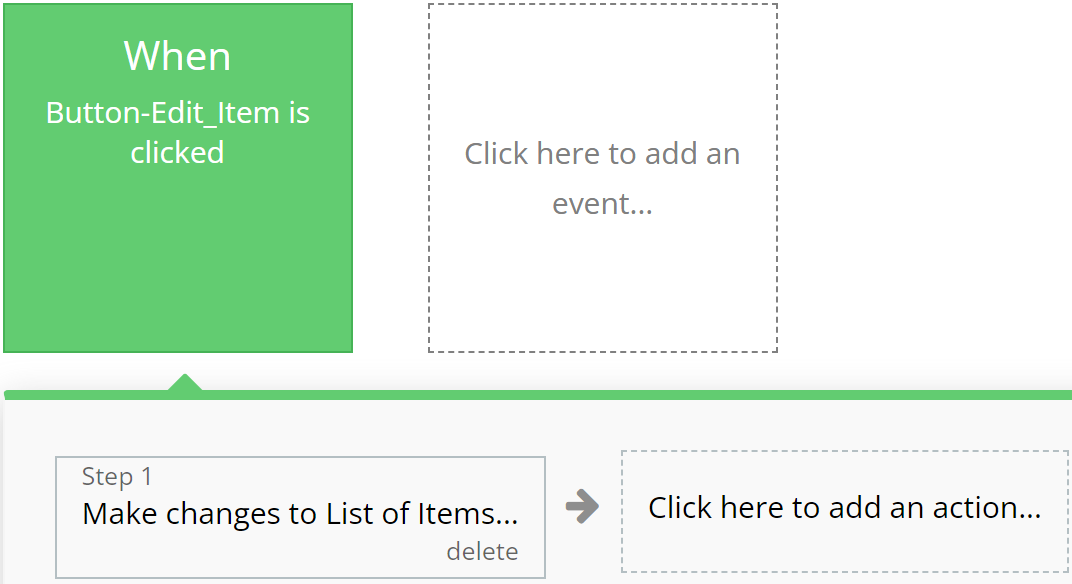
### **Green**

Emphasizes actions related to creating or modifying records in the database, indicating successful operation completion.

**For example:**

{% tabs %}
{% tab title="Example 1" %}

<figure><img src="https://content.gitbook.com/content/75MEj4aY0dTFxyHfvWoE/blobs/yFZGFXlJN58IwIN2FPFA/exmp%201.svg" alt=""><figcaption></figcaption></figure>
{% endtab %}

{% tab title="Example 2" %}

<figure><img src="https://content.gitbook.com/content/75MEj4aY0dTFxyHfvWoE/blobs/M5rAsZ7QHEa83gwtFzXm/exmp%202.svg" alt=""><figcaption></figcaption></figure>
{% endtab %}
{% endtabs %}

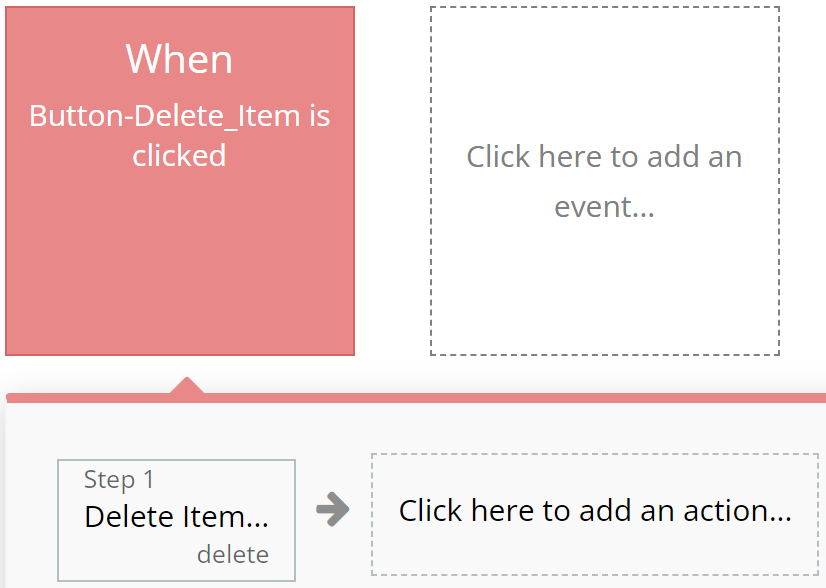
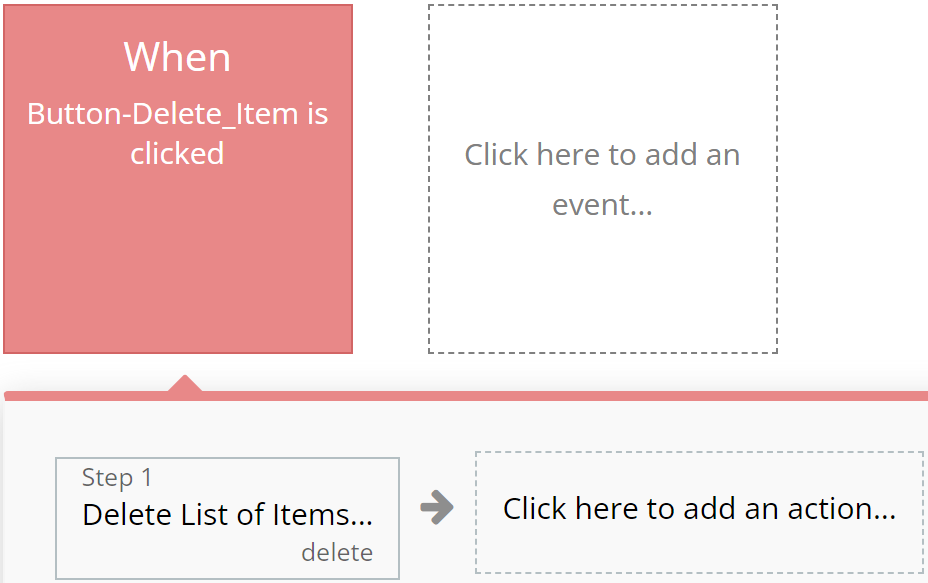
### **Red**

Designated for actions involving deletion or resetting of values, aiding users in quickly identifying them.

**For example:**

{% tabs %}
{% tab title="Example 1" %}

<figure><img src="https://content.gitbook.com/content/75MEj4aY0dTFxyHfvWoE/blobs/gZKFEXHkWEZOnUZX5nA9/exmp%203.svg" alt=""><figcaption></figcaption></figure>
{% endtab %}

{% tab title="Example 2" %}

<figure><img src="https://content.gitbook.com/content/75MEj4aY0dTFxyHfvWoE/blobs/GCIsV8vBtUbwB2HYmybL/exmp%204.svg" alt=""><figcaption></figcaption></figure>
{% endtab %}
{% endtabs %}

### **Blue**

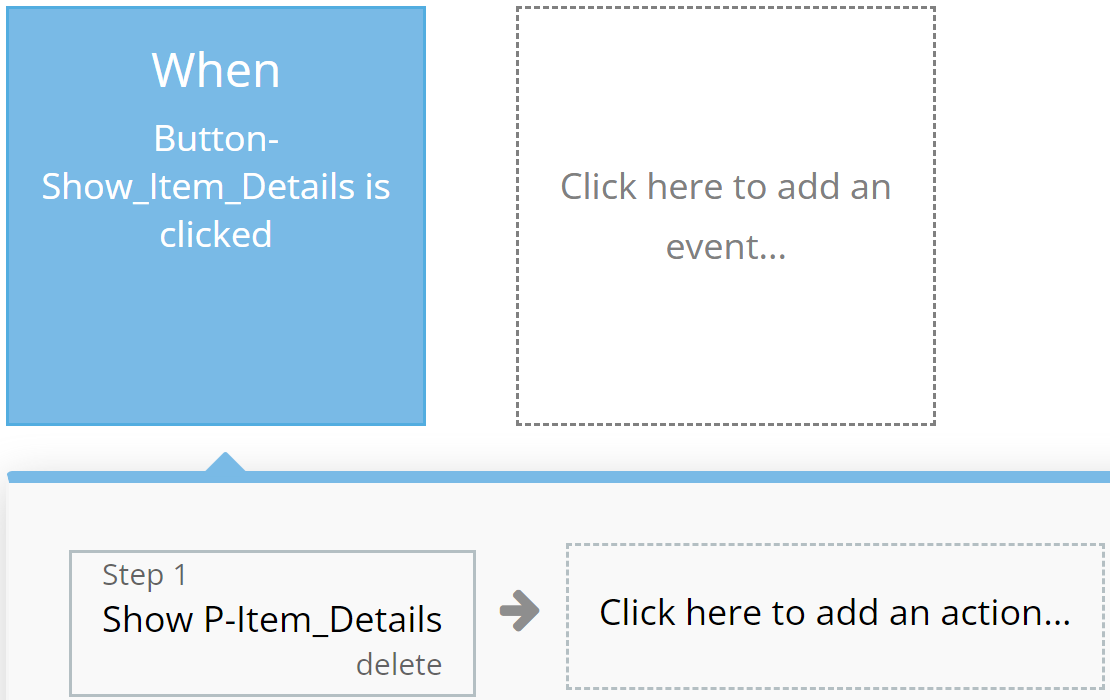
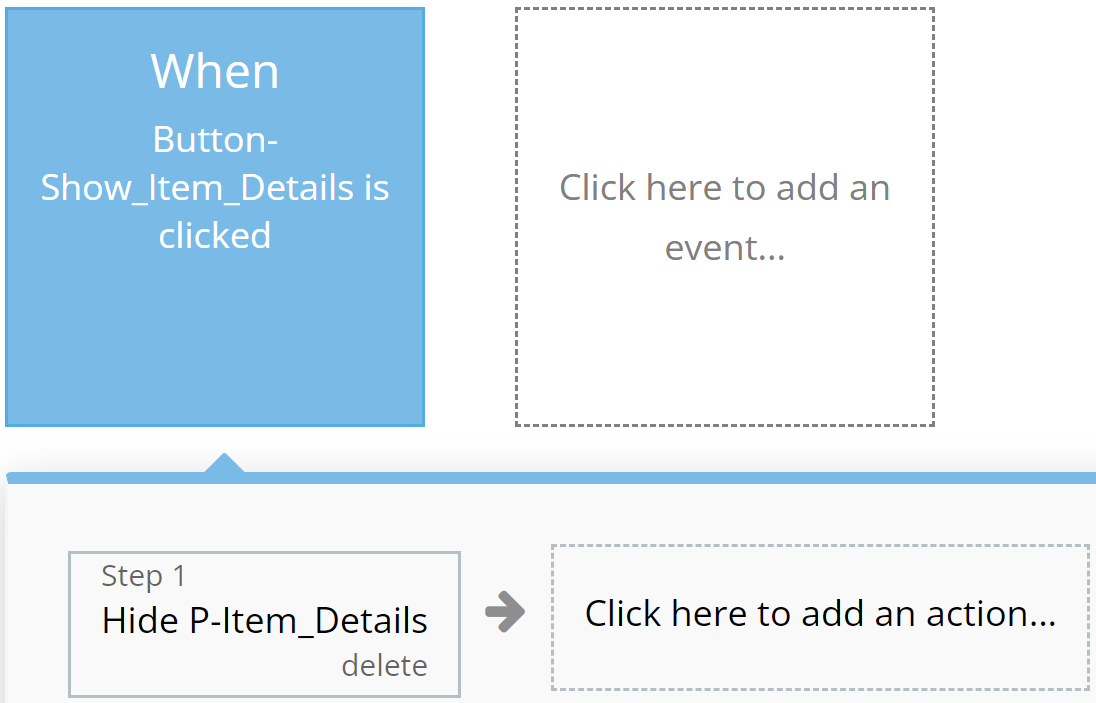
Reserved for actions that do not impact application resources, such as opening or closing pop-up windows.

**For example:**

{% tabs %}
{% tab title="Example 1" %}

<figure><img src="https://content.gitbook.com/content/75MEj4aY0dTFxyHfvWoE/blobs/GKeECEE2QwJnxz7QwIGJ/exmp%205.svg" alt=""><figcaption></figcaption></figure>
{% endtab %}

{% tab title="Example 2" %}

<figure><img src="https://content.gitbook.com/content/75MEj4aY0dTFxyHfvWoE/blobs/sSXCnKDoVxXPwUc1OHC8/exmp%206.svg" alt=""><figcaption></figcaption></figure>
{% endtab %}
{% endtabs %}

### **Orange**

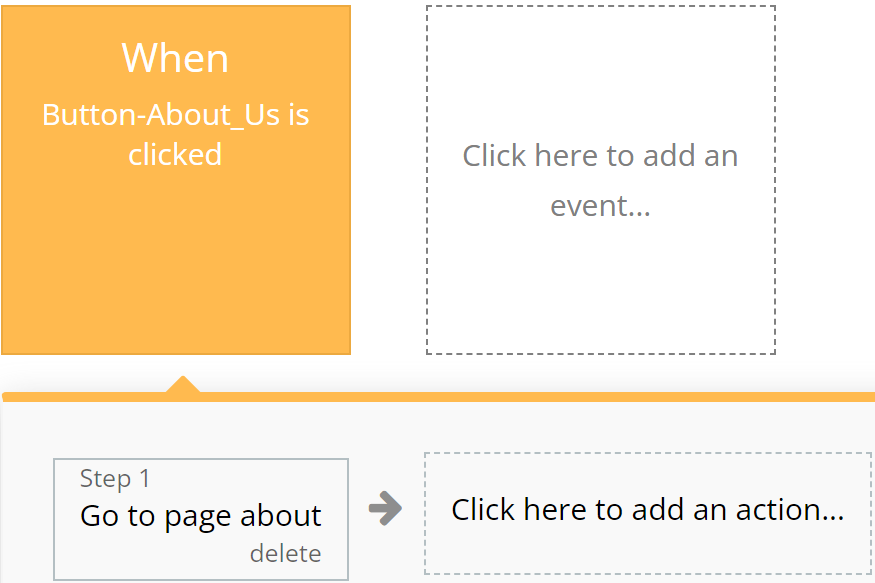
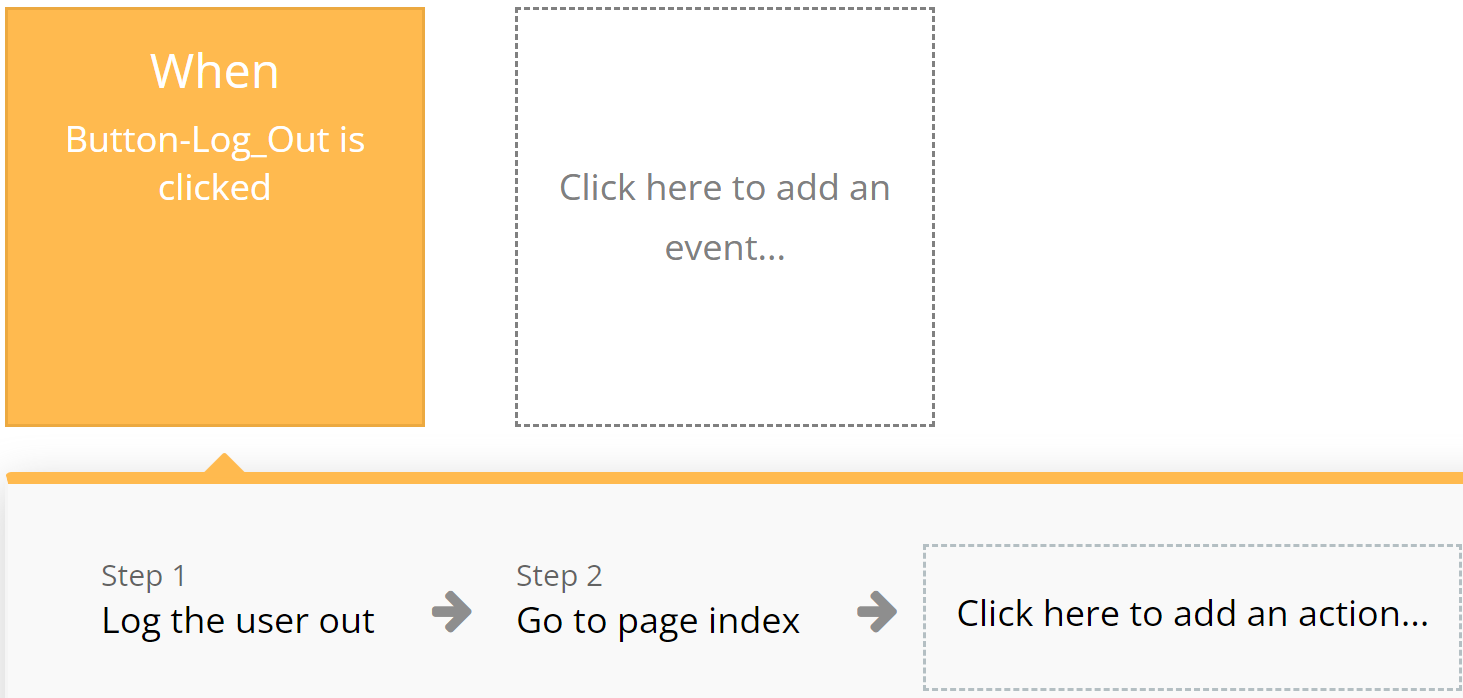
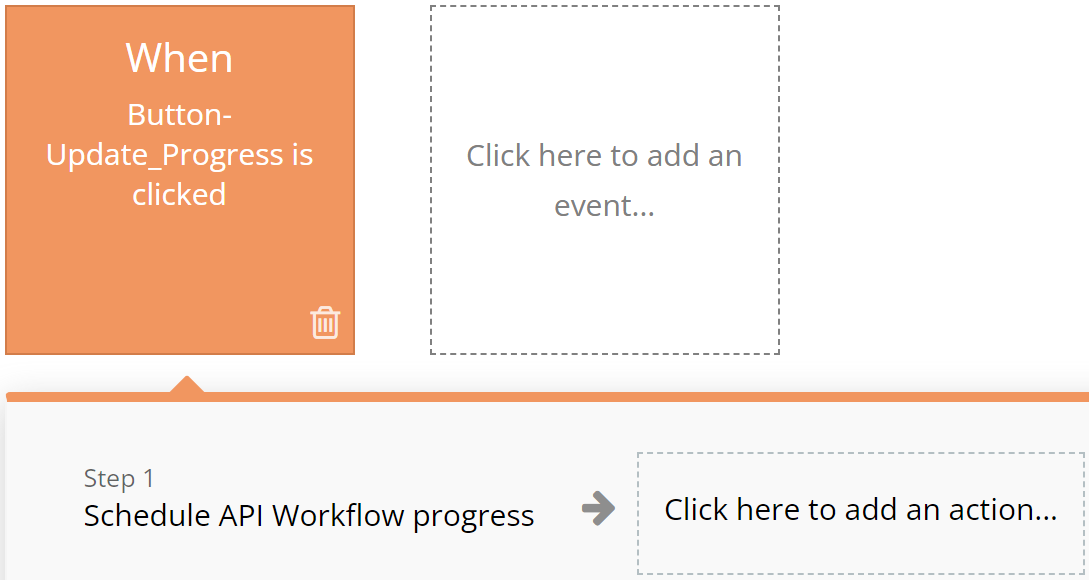
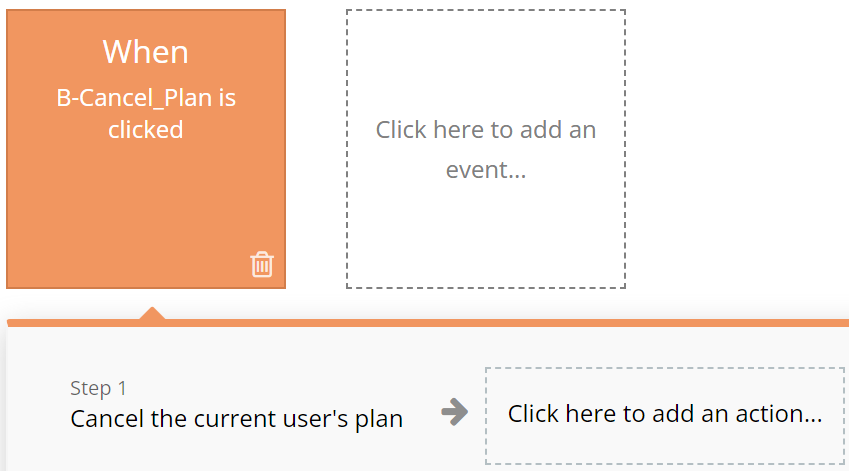
Used for actions related to app navigation, providing ease of orientation within the interface.

**For example:**

{% tabs %}
{% tab title="Example 1" %}

<figure><img src="https://content.gitbook.com/content/75MEj4aY0dTFxyHfvWoE/blobs/HSHBZg6sMUWT9XVdvLov/exmp%207.svg" alt=""><figcaption></figcaption></figure>
{% endtab %}

{% tab title="Example 2" %}

<figure><img src="https://content.gitbook.com/content/75MEj4aY0dTFxyHfvWoE/blobs/n85npd632yT6yLpbguqA/exmp%208.svg" alt=""><figcaption></figcaption></figure>
{% endtab %}
{% endtabs %}

### **Brown**

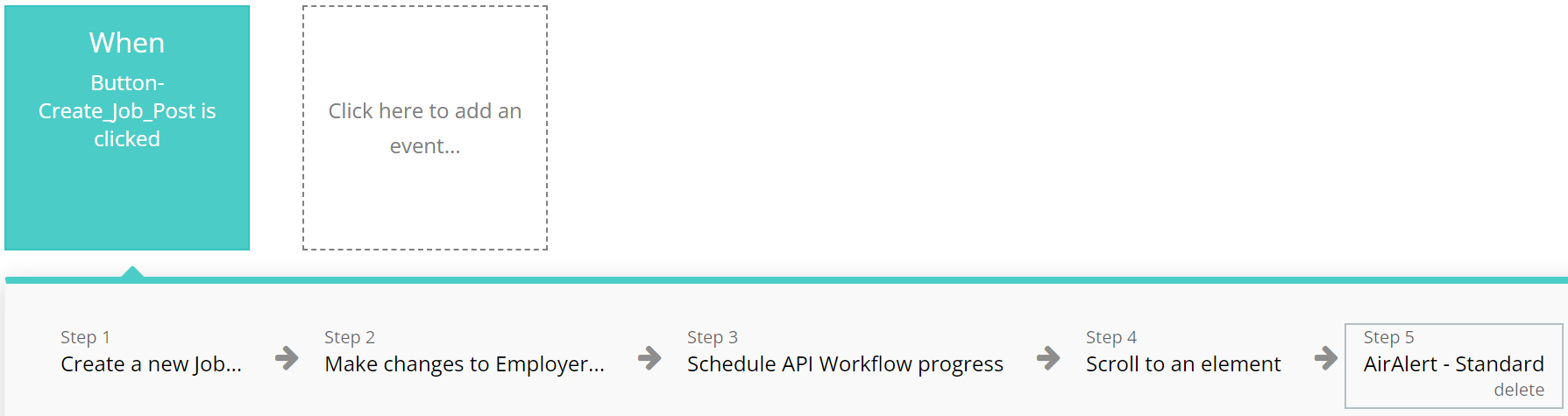
&#x20;Utilized for custom workflows and API work, highlighting these actions among others.

**For example:**

{% tabs %}
{% tab title="Example 1" %}

<figure><img src="https://content.gitbook.com/content/75MEj4aY0dTFxyHfvWoE/blobs/aOW8CRVv2eOoViVsSAFu/exmp%209.svg" alt=""><figcaption></figcaption></figure>
{% endtab %}

{% tab title="Example 2" %}

<figure><img src="https://content.gitbook.com/content/75MEj4aY0dTFxyHfvWoE/blobs/fhEoBbVIJNhX47td0Qj5/exmp%2010.svg" alt=""><figcaption></figcaption></figure>
{% endtab %}
{% endtabs %}

### **Purple**

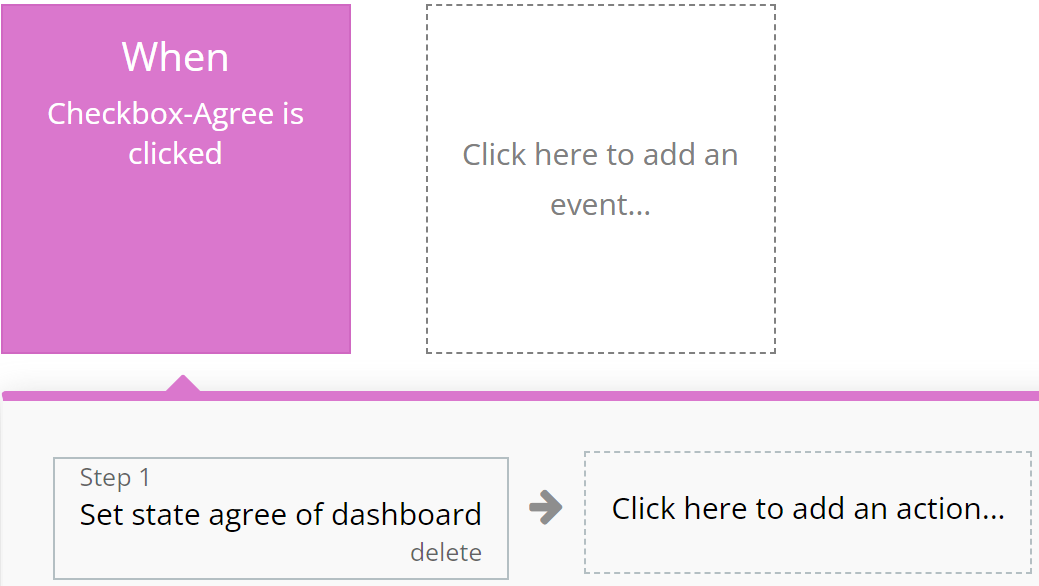
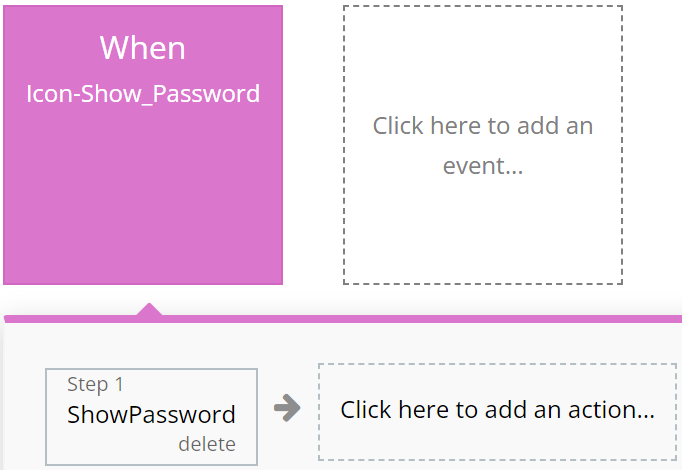
Left to the developer's discretion for assigning color to actions as they see fit.

**For example:**

{% tabs %}
{% tab title="Example 1" %}

<figure><img src="https://content.gitbook.com/content/75MEj4aY0dTFxyHfvWoE/blobs/ThAqNENxzSpZkMNAj2nr/purple%201.svg" alt=""><figcaption></figcaption></figure>
{% endtab %}

{% tab title="Example 2" %}

<figure><img src="https://content.gitbook.com/content/75MEj4aY0dTFxyHfvWoE/blobs/Fnvh4yyaMGaBML6w4aet/purple%202.svg" alt=""><figcaption></figcaption></figure>
{% endtab %}
{% endtabs %}

### **Cyan**

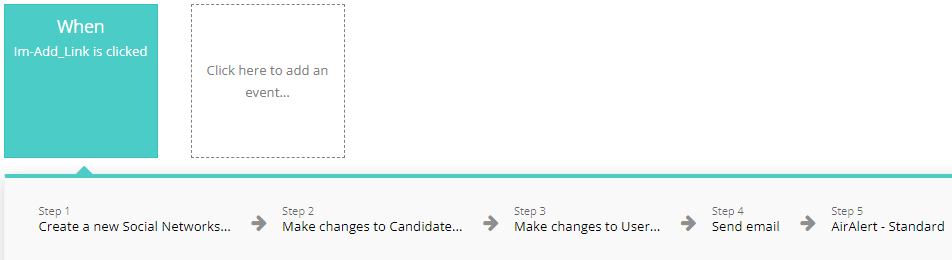
&#x20;**I**ntended for actions involving the use of Custom Events, ensuring ease of perception for complex operations.

**For example:**

{% tabs %}
{% tab title="Example 1" %}

<figure><img src="https://content.gitbook.com/content/75MEj4aY0dTFxyHfvWoE/blobs/lGvn3D5JEUh4yXW2pICj/cyan%201.svg" alt=""><figcaption></figcaption></figure>
{% endtab %}

{% tab title="Example 2" %}

<figure><img src="https://content.gitbook.com/content/75MEj4aY0dTFxyHfvWoE/blobs/nw3r6qfqtibG7Y8Dw7LO/cyan%202.svg" alt=""><figcaption></figcaption></figure>
{% endtab %}
{% endtabs %}

### **Grey**

Employed for all other actions not covered by other colors, aiding in making the interface clear and balanced.

For example:

{% tabs %}
{% tab title="Example 1" %}

<figure><img src="https://content.gitbook.com/content/75MEj4aY0dTFxyHfvWoE/blobs/UECsmnNCmsPrY0B9v66l/grey%201.svg" alt="" width="352"><figcaption></figcaption></figure>
{% endtab %}
{% endtabs %}

{% hint style="warning" %}
These standards are purely recommendations. Possible discrepancies do not affect the functionality of the application.
{% endhint %}

***

## Pages

*Below, you will find a list of all the pages available on this platform, along with a brief description of their functionality.*

\ <mark style="color:orange;">**Index:**</mark> Explore our landing page for insights on the template, featuring descriptions, a company directory, the best courses and the ability to sort them by category.

<mark style="color:orange;">**All Courses:**</mark> This page contains a brief description with all the courses that are on our site and also there is a possibility to sort them by:&#x20;

* Categories&#x20;
* Skills&#x20;
* Duration
* Price

<mark style="color:orange;">**Course Page:**</mark> Contains all information about the course such as title, price, duration, how many students have purchased this course, description, what will be taught on this course reviews and many more useful information.

<mark style="color:orange;">**Contact Us:**</mark> Connect with platform administrators effortlessly through our user-friendly contact page.

<mark style="color:orange;">**Dashboard Student:**</mark> This is a place where students can manage and view all information about their purchased courses, favorite courses, interaction, notes and there is also a section with account settings and help.

<mark style="color:orange;">**Dashboard Teacher:**</mark> This is a place where teachers can manage and view all information about their courses, performance, analytics, interaction and there is also a section with account settings and help.

<mark style="color:orange;">**Docs:**</mark> Access all necessary platform documentation, including Privacy Policy, Terms & Conditions, and Frequently Asked Questions (FAQ).

<mark style="color:orange;">**About Us:**</mark> Explore our about us page for insights more information about us.

<mark style="color:orange;">**Check Out:**</mark> This is the page where the student enters when he/she buys a course and contains information and fields that must be filled in to buy the course.

<mark style="color:orange;">**Library:**</mark> This is a page with books where the student can sort them and buy the book they want.

<mark style="color:orange;">**Register Page:**</mark> A page where users can create an account and also log in to the site.

<mark style="color:orange;">**Reset Password:**</mark> Effortlessly reset your password and receive updated login credentials for seamless access.

***

## Reusable elements

1. **Footer** - a section at the bottom of a web page containing additional information such as contacts and links. Used in the following pages: <mark style="color:orange;">Found on all application pages.</mark>
2. **Header** - the top part of a web page containing the logo, application name, navigation elements, and other important components. <mark style="color:orange;">Found on all application pages.</mark>
3. **Signup / Login Popup -** A popup where users can create an account and also log in to the site.

***

## Data Types

### Category

This data type is designed for storing all Categories related information.

| Field name | Type    | Notes             |
| ---------- | ------- | ----------------- |
| `Image`    | `Image` | Image of category |
| `Name`     | `Text`  | Category name     |

### Course

This data type is designed for storing information related to Course.&#x20;

| Field name         | Type                                                | Notes                     |
| ------------------ | --------------------------------------------------- | ------------------------- |
| `Active`           | `Yes/No`                                            | Course status             |
| `Category`         | [`Category`](#category)                             | Course category           |
| `Description`      | `Text`                                              | Course description        |
| `Feedback`         | `List of` [`Feedbacks`](#feedback)                  | Course feedbacks          |
| `Name`             | `Text`                                              | Course name               |
| `Photo`            | `Image`                                             | Course photo              |
| `Price`            | `Number`                                            | Course price              |
| `Purchased`        | `List of` [`Purchases`](#purchased)                 | Purchased courses         |
| `Rating`           | `Number`                                            | Course rating             |
| `Sections`         | `List of` [`Sections`](#section)                    | Course sections           |
| `Skills`           | `List of Texts`                                     | Course skills             |
| `Statistic`        | `List of` [`Course Statistics`](#course-statistics) | Course statistics         |
| `Students`         | `List of` [`Students`](#student)                    | Course students           |
| `Teacher`          | [`Teacher`](#teacher)                               | Course teacher            |
| `Training Process` | `List of Texts`                                     | Course training progress  |
| `What Will Learn`  | `List of Text`                                      | What will learn in course |

### Course Statistics

This data type is designed for storing information related to Course statistics.

| Field name         | Type                           | Notes                   |
| ------------------ | ------------------------------ | ----------------------- |
| `Complete Lessons` | `List of` [`Lessons`](#lesson) | Course complete lessons |
| `Course`           | [`Course`](#course)            | Course name             |
| `End Date`         | `Date`                         | Course end date         |
| `Start Date`       | `Date`                         | Course start date       |
| `Student`          | [`Student`](#student)          | Student name            |

### Doc

This data type is designed for storing information regarding Docs.

| Field name    | Type                                                                         | Notes           |
| ------------- | ---------------------------------------------------------------------------- | --------------- |
| `Cover`       | `Image`                                                                      | Doc Image       |
| `Description` | `Text`                                                                       | Doc description |
| `File`        | `File`                                                                       | Doc file        |
| `Genres`      | <p><code>Option set:</code><br><a href="#genres"><code>Genres</code></a></p> | Doc genres      |

### Features

This data type is designed for storing information regarding Features.&#x20;

| Field name    | Type   | Notes               |
| ------------- | ------ | ------------------- |
| `Description` | `Text` | Feature description |
| `Title`       | `Text` | Feature title       |

### Feed

This data type is designed for storing information regarding Feed.

| Field name | Type    | Notes        |
| ---------- | ------- | ------------ |
| `Body`     | `Text`  | Feed content |
| `Country`  | `Text`  | Feed country |
| `Creator`  | `Text`  | Feed creator |
| `Image`    | `Image` | Feed image   |

### Feedback

This data type is designed for displaying preview of Feedback.

| Field name | Type                | Notes            |
| ---------- | ------------------- | ---------------- |
| `Comment`  | `Text`              | Feedback content |
| `Course`   | [`Course`](#course) | Feedback course  |
| `Rating`   | `Number`            | Feedback rating  |

### Lesson

This data type is designed for storing all information related to Lesson.<br>

| Field name    | Type                   | Notes              |
| ------------- | ---------------------- | ------------------ |
| `Course`      | [`Course`](#course)    | Course name        |
| `Description` | `Text`                 | Lesson description |
| `Materials`   | `List of Files`        | Lesson materials   |
| `Name`        | `Text`                 | Lesson name        |
| `Questions`   | `List of` [`QAs`](#qa) | Lesson questions   |
| `Section`     | [`Section`](#section)  | Lesson section     |
| `Time`        | `Number`               | Lesson time        |
| `URL`         | `Text`                 | Lesson URL         |

### Note

This data type is designed for storing all candidate related Notes.<br>

| Field name    | Type   |                  |
| ------------- | ------ | ---------------- |
| `Content`     | `Text` | Note content     |
| `Creator`     | `User` | Note creator     |
| `Create Date` | `Date` | Note create date |

### Notification

This data type is designed for storing user related information to Notification.<br>

| Field name  | Type                |                        |
| ----------- | ------------------- | ---------------------- |
| `Course`    | [`Course`](#course) | Course name            |
| `Recipient` | `User`              | Notification recipient |
| `Seen`      | `Yes/No`            | Notification seen      |
| `Sender`    | `User`              | Notification sender    |
| `Text`      | `Text`              | Notification content   |

### Progress

This data type is designed for storing user related information to Progress.

| Field name  |                           |                    |
| ----------- | ------------------------- | ------------------ |
| `Lesson`    | [`Lesson`](#lesson)       | Lesson name        |
| `Purchased` | [`Purchased`](#purchased) | Progress purchased |
| `Status`    | `Yes/No`                  | Progress status    |

### Purchased

This data type is designed for storing Purchased related information.<br>

| Field name         | Type                              |                    |
| ------------------ | --------------------------------- | ------------------ |
| `Course Price`     | [`Course`](#course)               | Course price       |
| `Course Purchased` | `Number`                          | Course purchased   |
| `Progress`         | `List of` [`Progress`](#progress) | Purchased progress |
| `Student`          | [`Student`](#student)             | Purchased student  |

### QA

This data type is designed for storing QA related information.<br>

| Field name | Type                |                  |
| ---------- | ------------------- | ---------------- |
| `Answer`   | `Text`              | Answer content   |
| `Course`   | [`Course`](#course) | Course name      |
| `Lesson`   | [`Lesson`](#lesson) | Lesson name      |
| `Question` | `Text`              | Question content |

### Section

This data type is designed for storing Section related information.<br>

| Field name | Type                           |                 |
| ---------- | ------------------------------ | --------------- |
| `Course`   | [`Course`](#course)            | Course name     |
| `ID`       | `Number`                       | Section ID      |
| `Lesson`   | `List of` [`Lessons`](#lesson) | Section lessons |
| `Name`     | `Text`                         | Section name    |

### Student

This data type is designed for storing Student related information.<br>

| Field name          | Type                                                 |                          |
| ------------------- | ---------------------------------------------------- | ------------------------ |
| `Complete Courses`  | `List of` [`Courses`](#course)                       | Student complete courses |
| `Course Statistics` | `List of` [`Courses Statistics`](#course-statistics) | Student statistics       |
| `Courses`           | `List of` [`Courses`](#course)                       | Student courses          |
| `Favorites Courses` | `List of` [`Courses`](#course)                       | Student favorite courses |
| `Finished Lesson`   | `List of` [Lessons](#lesson)                         | Student lessons          |
| `Library`           | `List of` [`Docs`](#doc)                             | Student docs             |
| `Purchased`         | `List of` [`Purchases`](#purchased)                  | Student purchased        |
| `Teachers`          | `List of` [`Teachers`](#teacher)                     | Student teachers         |

### Teacher

This data type is designed for storing Teacher related information.<br>

| Field name       | Type                             |                        |
| ---------------- | -------------------------------- | ---------------------- |
| `Bio`            | `Text`                           | Teacher bio            |
| `Courses`        | `List of` [`Courses`](#course)   | Teacher courses        |
| `Feedback`       | `List of` [`Feeds`](#feedback)   | Teacher feedbacks      |
| `Library`        | `List of` [`Docs`](#doc)         | Teacher libraries      |
| `Specialization` | `Text`                           | Teacher specialization |
| `Students`       | `List of` [`Students`](#student) | Teacher students       |

### User

This data type is designed for storing user related information and precisely to indicate user type. <br>

| Field name            | Type                                                                                  |                                |
| --------------------- | ------------------------------------------------------------------------------------- | ------------------------------ |
| `About`               | `Text`                                                                                | User information               |
| `Courses`             | `List of` [`Courses`](#course)                                                        | User courses                   |
| `Email Notifications` | `Yes/No`                                                                              | User email notification status |
| `Email`               | `Text`                                                                                | User email                     |
| `Name`                | `Text`                                                                                | User name                      |
| `Notes`               | `List of` [`Notes`](#note)                                                            | User notes                     |
| `Notifications`       | `Yes/No`                                                                              | User notification status       |
| `Profile Photo`       | `Image`                                                                               | User photo                     |
| `Purchased`           | `List of` [`Purchases`](#purchased)                                                   | User purchased                 |
| `Student`             | [`Student`](#student)                                                                 | User students                  |
| `Surname`             | `Text`                                                                                | User surname                   |
| `Teacher`             | [`Teacher`](#teacher)                                                                 | User teachers                  |
| `Type`                | <p><code>Option set:</code></p><p><a href="#user-type"><code>User Type</code></a></p> | User type                      |

***

## Option sets&#x20;

#### Duration

* 1 - 5 lessons
* 6 - 10 lessons
* 11 - 15 lessons
* 16 - 20 lessons

#### Genres

* Art
* Article
* Bios & History
* Science
* Psychology

#### Notification Type

* New course!
* Platform news!

#### User Type

* Teacher
* Student

***

<figure><img src="https://content.gitbook.com/content/75MEj4aY0dTFxyHfvWoE/blobs/1sfToLrjZRercTbZr4Rx/Logo-Appassion.png" alt=""><figcaption></figcaption></figure>

The template is available in its current form, however, further alterations can be negotiated.&#x20;

Don't hesitate to reach out to us with any questions, and we'll gladly explore options to accommodate your concepts – Visit us at [<mark style="color:orange;">https://appassion.io/</mark>](https://appassion.io/) or email us at <mark style="color:orange;"><dev@appassion.io></mark>

<mark style="color:orange;">**We are always at your service through:**</mark> [Upwork](https://www.upwork.com/agencies/1472948949083369472/), [Clutch](https://clutch.co/profile/appassion#highlights). \ <br>